Seniority Support Logo
Header icon

Technology Support Services


Seniority Support offers assistance for technology in many different ways. From installation and configuration, to troubleshooting and training – Check out our comprehensive list of supported products and services below.


Looking for help with a specific device or feature? Just ask. We offer support for most devices & services.


Need help with something more obscure? We can help with that too. Seniority Support has options for almost everything technology related.


Still can't find what your looking for? Don't worry, if we can't help you directly, we'll help you find someone who can.  Call us today! 1-800-935-6959


Service Categories


Seniority Support services are rated by their technical proficiency requirements. We specialize in helping users who are just starting out with basic devices, all the way to more advanced services and technology. Please refer to our skill level assessment chart below to see what services are available to you.


Skill Level
🟦 Novice (Level 1)      🟩 Beginner (Level 2)      🟨 Amature (Level 3)      🟧 Intermediate (Level 4)


💻 Computers

  • 🟦  Desktop Computers
  • 🟦  Laptop Computers
  • 🟩  All-In-One Computers
  • 🟩  Tablet Computers
  • 🟨  Home Theater PCs
  • 🟧  Servers & Cloud Computing

📱 Mobile Devices

  • 🟦  Smartphones
  • 🟦  Tablets
  • 🟦  Headphones
  • 🟩  Smartwatches
  • 🟩  E-Readers
  • 🟩  Music Players
  • 🟨  GPS Navigation

🎬 Entertainment

  • 🟦  Streaming Services
  • 🟦  Digital Downloads
  • 🟩  Video Game Consoles
  • 🟩  Electronic Toys
  • 🟨  E-Bikes & Scooters
  • 🟨  R/C Vehicles & Drones

🖨️ Peripherals

  • 🟦  Keyboards & Mice
  • 🟦  Monitors
  • 🟦  Battery Backups (UPS)
  • 🟩  Printers & Scanners
  • 🟩  Fax Machines
  • 🟩  Speakers & Headsets
  • 🟩  Webcams
  • 🟩  External Hard Drives

📷 Cameras

  • 🟦  Smartphone Cameras
  • 🟦  Instant Cameras
  • 🟦  Camera Accessories
  • 🟩  Security & Doorbell Cameras
  • 🟩  Action, Trail & Dash Cameras
  • 🟨  Digital & Film Cameras
  • 🟨  Camcorders
  • 🟨  Lenses, Filters & Tripods

📺 Audio & Video

  • 🟦  Televisions & Projectors
  • 🟦  Streaming Devices
  • 🟦  Disc Players
  • 🟦  Microphones
  • 🟩  Receivers & Speakers
  • 🟩  Cable & Satellite TV
  • 🟩  Remote Controls
  • 🟨  Cables & Adapters

🌐 Networking

  • 🟦  Home Internet
  • 🟦  Wi-Fi & Ethernet
  • 🟩  Mobile Hotspots
  • 🟩  Modems & Routers
  • 🟨  Access Points & Repeaters
  • 🟨  Network / Cloud Storage
  • 🟧  Firewalls & VPNs

🔒 Safety & Security

  • 🟦  Scam & Fraud Prevention
  • 🟦  Internet Security
  • 🟦  Security Updates
  • 🟩  Spam & Ad-Blockers
  • 🟩  Parental Controls
  • 🟨  Email Archiving
  • 🟧  Backup & File Recovery
  • 🟧  Virus & Malware Removal

🏠 Home Automation

  • 🟦  Home Assistants
  • 🟦  Timers & Reminders
  • 🟩  Wireless Remotes
  • 🟨  Smart Appliances
  • 🟨  Smart Lighting
  • 🟨  Digital Heating & Cooling
  • 🟧  Home Security Systems

❤️ Health & Wellness

  • 🟦  Safety & Hazard Alarms
  • 🟩  Fitness Trackers
  • 🟩  Health Monitors
  • 🟨  Medical Alert Systems
  • 🟨  Mobility Devices
  • 🟨  Wearable Technology

🎓 Training Courses

  • 🟦  Multiple Skill Levels
  • 🟦  Step-By-Step Tutorials
  • 🟦  Follow-Along Videos
  • 🟩  Beginner Guides
  • 🟩  Online Learning Resources
  • 🟨  Personalized Instructions

🔌 Accessories

  • 🟦  Thumb Drives
  • 🟦  Memory Cards
  • 🟦  External Batteries
  • 🟩  Controllers & Sensors
  • 🟨  Stylus Pens & Slates
  • 🟨  Docking Stations & Hubs


Header icon

How Would You Rate Your Technology Skills?


Seniority Support strives to give each of our callers a firm grasp of their current skill level, before moving on to services with higher requirements. If you have any questions, please ask your Seniority Support Expert during your call.
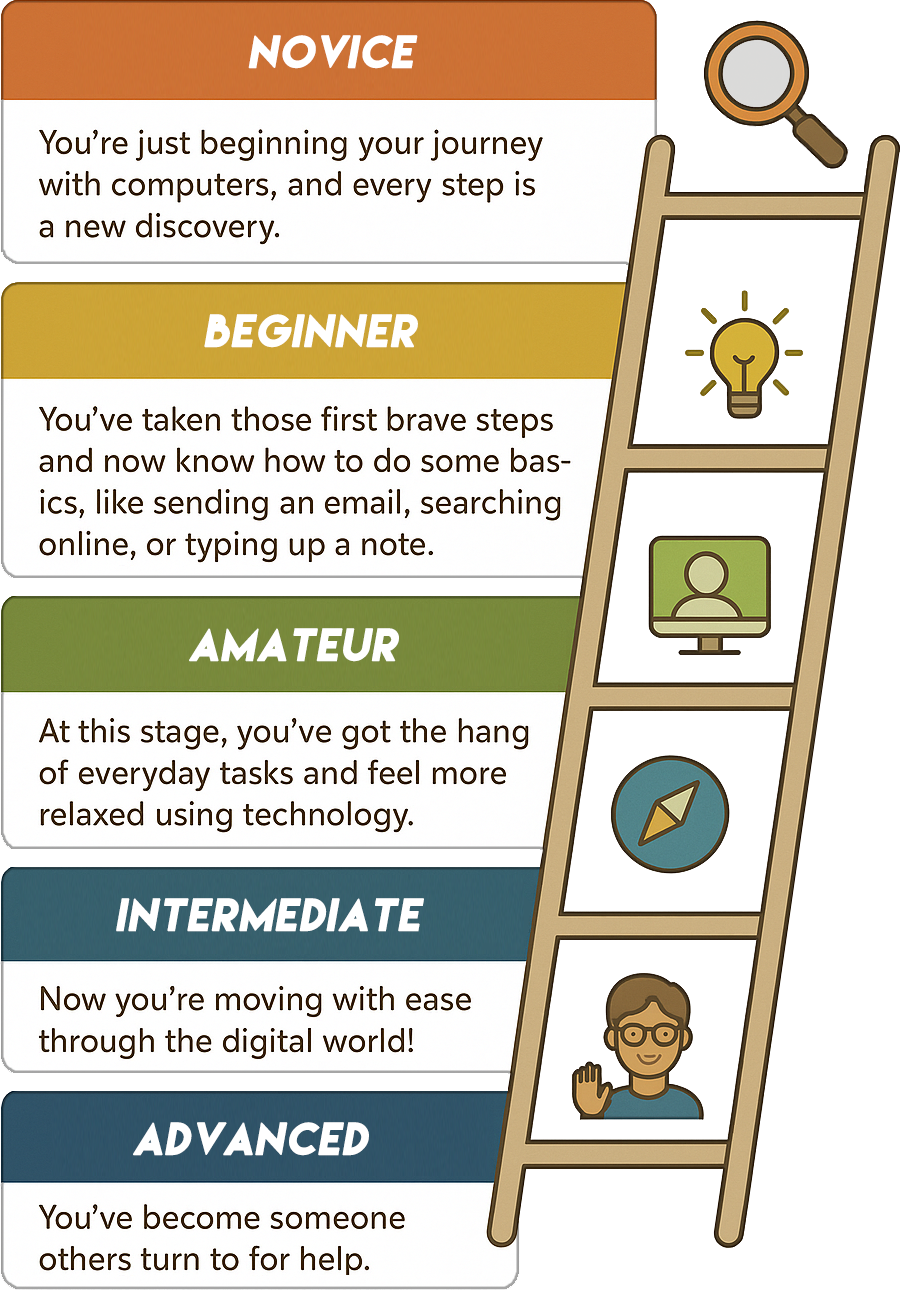


Skill Level Assesment

  1. Novice
    You may still be learning how to turn on the computer, use the mouse, or open a simple program - but that's perfectly okay! Every expert started right where you are, and your curiosity is the most important tool you carry.

  2. Beginner
    You may still need reminders here and there, but you're building confidence each time you practice. You're well on your way to making technology a helpful companion in daily life.

  3. Amateur
    Whether it's joining a video call, shopping online, or keeping up with family on social media, you're finding new ways to stay connected and entertained. You may not know all the shortcuts, but you know enough to get where you need to go.

  4. Intermediate
    You can manage settings, explore apps, and even help a friend with their questions. Technology feels more like a familiar tool than a challenge, and you're comfortable exploring new features on your own.

Skill Level Ladder